install 1k3 ubuntu 13.10
sudo apt-get install ndiswrapper-common ndiswrapper-utils-1.91. plug in your modem and check it
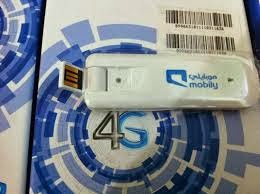
lsusb
Bus 002 Device 049: ID 0408:ea26 Quanta Computer, Inc.
Bus 002 Device 001: ID 1d6b:0002 Linux Foundation 2.0 root hub
Bus 008 Device 001: ID 1d6b:0001 Linux Foundation 1.1 root hub
Bus 007 Device 001: ID 1d6b:0001 Linux Foundation 1.1 root hub
Bus 006 Device 001: ID 1d6b:0001 Linux Foundation 1.1 root hub
Bus 005 Device 023: ID 1a81:1705 Holtek Semiconductor, Inc.
Bus 005 Device 001: ID 1d6b:0001 Linux Foundation 1.1 root hub
Bus 001 Device 004: ID 04f2:b160 Chicony Electronics Co., Ltd
Bus 001 Device 001: ID 1d6b:0002 Linux Foundation 2.0 root hub
Bus 004 Device 001: ID 1d6b:0001 Linux Foundation 1.1 root hub
Bus 003 Device 002: ID 0a5c:2151 Broadcom Corp. Bluetooth
Bus 003 Device 001: ID 1d6b:0001 Linux Foundation 1.1 root hub
2. create file : /etc/usb_modeswitch.d/0408:ea25 the content as below :
DefaultVendor= 0x0408
DefaultProduct= 0xea25
TargetVendor= 0x0408
TargetProduct= 0xea26
MessageContent="5553424312345678000000000000061b004600000000000000000000000000"
CheckSuccess=20
3. add this command to /lib/udev/rules.d/40-usb_modeswitch.rules
# LTE Modem 1k3m
ATTRS{idVendor}=="0408", ATTRS{idProduct}=="ea25", RUN+="usb_modeswitch '%b/%k'"
4. add this command to /etc/modprobe.d/mobily-lte.conf
options usbserial vendor=0x0408 product=0xea26
5. restart the services
sudo service udev restart
sudo rmmod option
sudo rmmod usb_wwan
sudo rmmod usbserial
sudo modprobe usbserial
sudo modprobe usb_wwan
sudo modprobe option
sudo rmmod usbserial
sudo modprobe usbserial
sudo modprobe usb_wwan
sudo modprobe option
6. unplug the modem, then plug it again, and check with dmesg, you should see as below :
[59549.312083] usb 2-3: new high-speed USB device number 49 using ehci-pci
[59549.448151] usb 2-3: New USB device found, idVendor=0408, idProduct=ea26
[59549.448159] usb 2-3: New USB device strings: Mfr=3, Product=2, SerialNumber=0
[59549.448164] usb 2-3: Product: Qualcomm CDMA Technologies MSM
[59549.448168] usb 2-3: Manufacturer: Qualcomm, Incorporated
[59549.450481] usbserial_generic 2-3:1.0: The "generic" usb-serial driver is only for testing and one-off prototypes.
[59549.450487] usbserial_generic 2-3:1.0: Tell linux-usb@vger.kernel.org to add your device to a proper driver.
[59549.450491] usbserial_generic 2-3:1.0: generic converter detected
[59549.450593] usb 2-3: generic converter now attached to ttyUSB0
[59549.450987] usbserial_generic 2-3:1.1: The "generic" usb-serial driver is only for testing and one-off prototypes.
[59549.450992] usbserial_generic 2-3:1.1: Tell linux-usb@vger.kernel.org to add your device to a proper driver.
[59549.450996] usbserial_generic 2-3:1.1: generic converter detected
[59549.451084] usb 2-3: generic converter now attached to ttyUSB1
[59549.451172] usbserial_generic 2-3:1.2: The "generic" usb-serial driver is only for testing and one-off prototypes.
[59549.451177] usbserial_generic 2-3:1.2: Tell linux-usb@vger.kernel.org to add your device to a proper driver.
[59549.451181] usbserial_generic 2-3:1.2: generic converter detected
[59549.451269] usb 2-3: generic converter now attached to ttyUSB2
[59549.451417] usbserial_generic 2-3:1.3: The "generic" usb-serial driver is only for testing and one-off prototypes.
[59549.451422] usbserial_generic 2-3:1.3: Tell linux-usb@vger.kernel.org to add your device to a proper driver.
[59549.451425] usbserial_generic 2-3:1.3: generic converter detected
[59549.452844] usb 2-3: generic converter now attached to ttyUSB3
[59549.452956] usb-storage 2-3:1.4: USB Mass Storage device detected
7. create your dial-up profile on network connection menu, or you can use wvdial
note :
1. for band selection, you can choose on your profile, you may use LTE only or 3G only, or others as well.

2. light indicator color :
- violet : its ready to use, but its not LTE
- blue : its LTE ready
- red : your modem in trouble
3. forcing to LTE service with wvdial, according to http://www.eigenmagic.com/2012/03/14/how-to-get-telstra-4g-mobile-broadband-working-with-linux/
you should use AT+ZSNT=6,0,0 to force on LTE
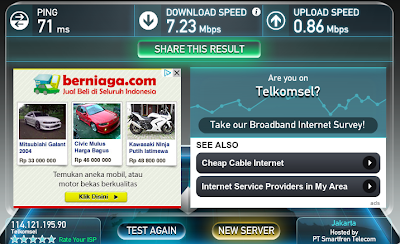
the speedtest with telkomsel card is :
you should use AT+ZSNT=6,0,0 to force on LTE
the speedtest with telkomsel card is :


